Workflow automation means designing a repeatable sequence of steps — each with a clear input, a clear output, and a clean handoff to the next step — so a process runs without you re-deciding how to do it every single time. It is not the same thing as simply “using AI to work faster.” It is a system, and like any system, it can be mapped, built, and improved.
Most guides to workflow automation open with that definition, then jump straight to a list of tools. This one starts with a real example instead, because the definition only means something once you’ve seen it in practice.
A few months ago, producing one long-form video for a faceless YouTube channel meant touching a dozen separate tools by hand: writing the script, breaking it into scenes, writing image prompts for every scene, generating those images, animating them, generating voiceover, syncing it all in an editor, writing a title and description, designing a thumbnail, and publishing. Every step depended on the one before it. Miss a detail in the script and you’d catch it three steps later, after the images were already generated.
The fix wasn’t a single tool. It was a workflow: a defined sequence of steps, each with a clear input and output, where the output of one step becomes the input of the next — with specific roles handling specific parts of the job instead of one person, or one AI prompt, trying to do everything at once.
That’s what workflow automation actually is: not a shortcut, but a system where each step is well-defined enough that it can run without constant manual re-checking.
In this guide:
Why workflow automation matters more than the time it saves
Time is the obvious saving, but it’s not the most important one. Three things change when a workflow gets automated properly.
Time. The clearest win, and the easiest to measure. If a task takes 45 minutes manually and 5 minutes once automated, that’s not a 40-minute saving — it’s a 40-minute saving every time the process runs. A weekly task saves over 34 hours a year. A daily task saves over 240.
Consistency. Manual processes drift. A task gets done slightly differently when you’re tired, rushed, or distracted, and quality varies without anyone noticing. An automated workflow does the same thing the same way every time, which turns quality into a property of the system rather than a property of how good a day someone is having.
Capacity. This is the one most people underestimate. A task that requires 45 minutes of active attention can only happen as often as there are 45 free minutes available for it. A task that requires 5 minutes of setup and then runs on its own can happen far more often, because it stops competing with everything else for attention. Automating a genuine bottleneck doesn’t just save time on that one task — it raises the ceiling on how much of everything else can get done.
The honest caveat: automation has an upfront cost. Building a workflow the first time almost always takes longer than doing the task manually once. The return comes from repetition. A one-off task isn’t worth automating. A task that will happen dozens or hundreds of times almost always is.
The three tiers of workflow automation
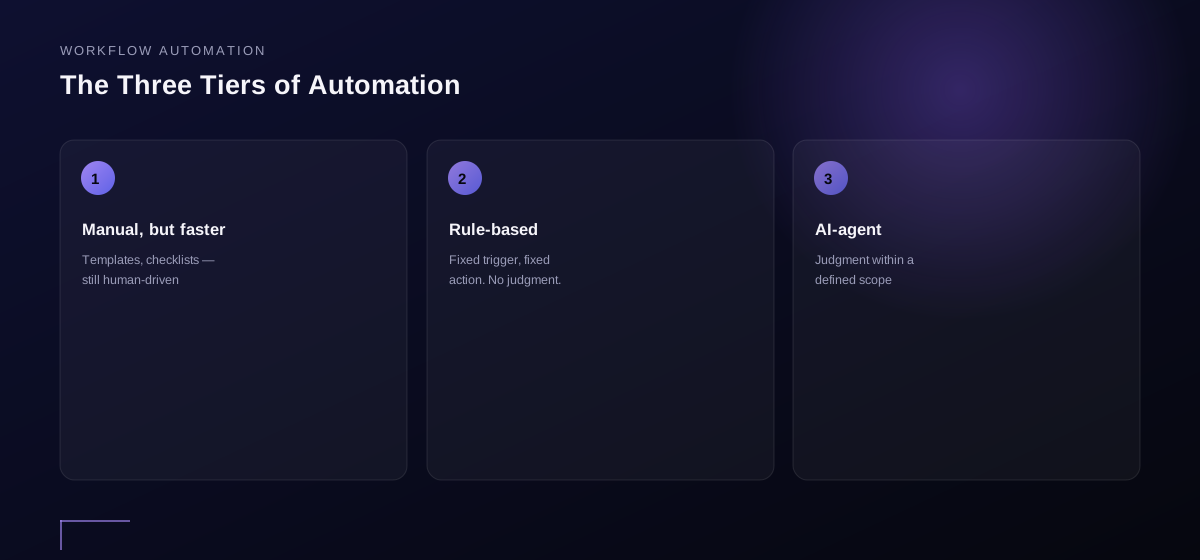
Not all workflow automation is the same, and conflating the tiers is where a lot of automation projects go wrong. There are three distinct levels, and each one solves a different kind of problem.
Tier 1: Manual, but faster. This is a person doing the task with better tools — templates, keyboard shortcuts, a well-organized checklist. It isn’t automation in the strict sense, but it’s often the right starting point, because it forces a real understanding of the process before any part of it gets handed off.
Tier 2: Rule-based automation. This is “when X happens, do Y” — a fixed trigger and a fixed action, with no judgment involved. A new form submission adds a row to a spreadsheet. A tagged email moves to a folder. A webhook fires when a CRM record changes, and an integration updates a second system automatically. No-code and low-code platforms like Zapier and Make live in this tier, connecting different pieces of software through their APIs without custom development. Rule-based automation is reliable and inexpensive to build, but it’s brittle — it can’t handle a case it wasn’t explicitly designed for, because it has no judgment. It does exactly what it was told, which is both its strength and its limit.
Tier 3: AI-agent automation. This is where a workflow doesn’t just follow a fixed rule — it makes a judgment call within a defined scope. An AI agent can read a messy customer message and decide which of five categories it belongs to. It can review a draft and flag what’s weak, not just confirm the draft exists. This tier handles the variability that rule-based automation can’t, but it needs clearer boundaries: instead of just defining a trigger and an action, it requires defining what “good” looks like, so the agent has a standard to judge against — the same principle covered in more depth in autonomous AI agents.
Most working systems mix all three tiers: a Tier 2 trigger starts the process, a Tier 3 agent handles the part that needs judgment, and a Tier 1 human approval step reviews the output before anything ships. The common mistake is assuming every task needs Tier 3. If a fixed rule solves it, a fixed rule is the better choice — it’s more predictable and far easier to maintain than an AI agent doing a job a simple rule could handle.
| Tier | Best for | Example | Main risk |
|---|---|---|---|
| Tier 1: Manual, but faster | Understanding a new process before automating it | Templates, checklists, keyboard shortcuts | Still limited by available human attention |
| Tier 2: Rule-based | Predictable, repetitive tasks with no exceptions | Form submission auto-creates a CRM record | Breaks on any case it wasn’t built for |
| Tier 3: AI-agent | Tasks that require judgment within a clear scope | Categorizing a messy customer inquiry | Needs a defined standard, or judgment drifts |
Where creators and small teams actually automate first
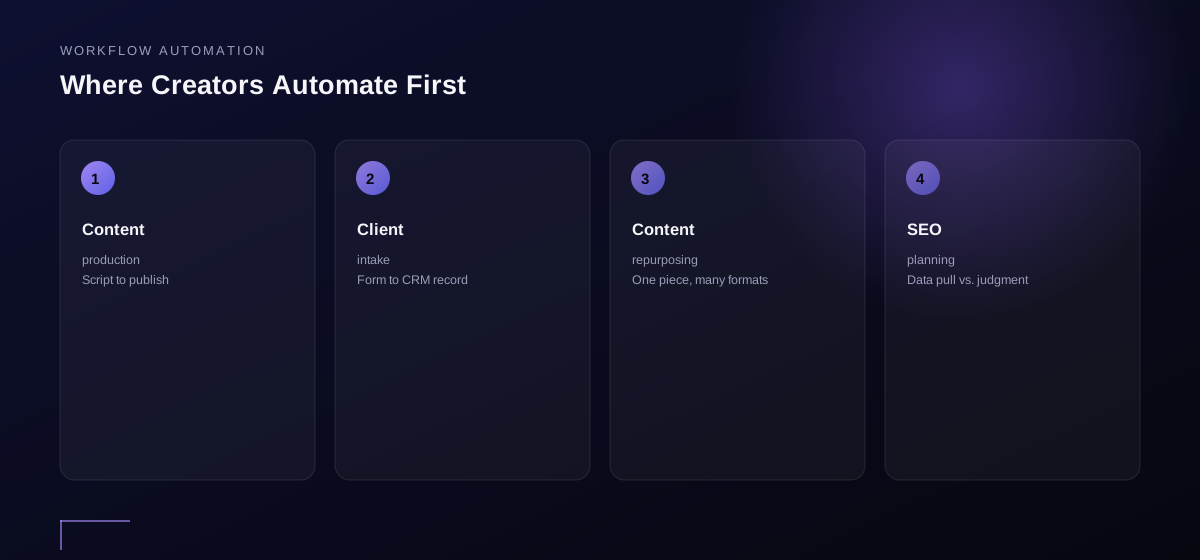
Generic workflow automation guides lean on back-office examples built for companies with departments — payroll, invoice approvals, HR onboarding. Most of that doesn’t apply to a solo creator or a five-person team. Here’s where the same three tiers show up in work that actually resembles a small operation’s day-to-day business operations:
Content production. The example at the top of this guide — script, scene plan, image prompts, voiceover, edit, publish. Tier 2 handles the mechanical handoffs, such as a finished voiceover file automatically dropping into the edit folder. Tier 3 handles judgment calls, like whether a scene’s visual actually matches the script’s tone. Tier 1 stays in place as a final human pass before anything goes live.
Client intake for a small agency or coaching practice. A form submission (a Tier 2 trigger) can create the client record in a CRM and send a welcome email automatically. Deciding whether the inquiry is a good-fit lead worth a call, versus one to auto-decline, is a judgment call — Tier 3 territory, with a human approval step before anything gets sent.
Content repurposing. One long-form piece becoming a short clip, a thread, and a newsletter blurb is a solid Tier 2/3 mix: pulling the transcript and formatting it for each platform is rule-based, but deciding which three minutes of a twenty-minute video are actually worth clipping needs judgment.
SEO and content planning. Pulling keyword data on a schedule is a clean Tier 2 task. Deciding which keyword is genuinely worth writing about, given a site’s current authority, is a Tier 3 judgment call — the same tier distinction covered in AI marketing automation — which is exactly why a content brief built on real search data matters more than the raw data pull itself.
The pattern holds across all four examples: the mechanical handoff gets automated first, the judgment call gets an AI agent with clear standards second, and a human stays in the loop wherever the cost of being wrong is high enough to matter.
How to map a process before you automate it
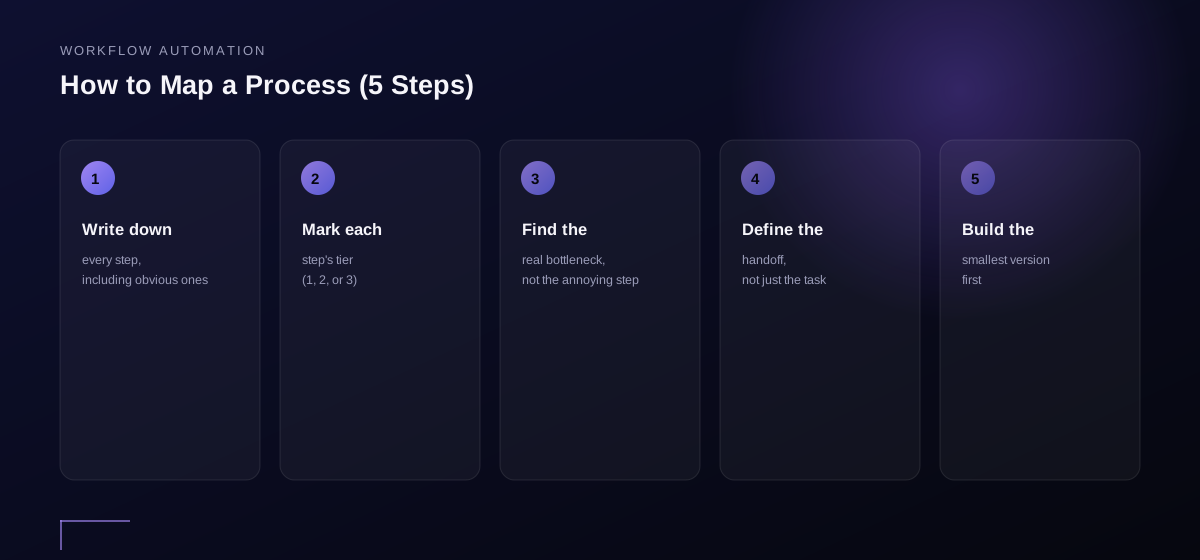
Automating a process that hasn’t been mapped is a fast way to automate chaos. Before touching a single tool, work through these five steps.
- Write down every step currently taken, in order, including the ones that feel too obvious to mention. The steps that get skipped in the write-up are usually the ones an automated system gets wrong first, because they were never actually rules — they were instincts.
- Mark each step with its tier. Is it a fixed rule (Tier 2)? Does it need judgment (Tier 3)? Does it genuinely need to stay with a human (Tier 1)? Not every step should be automated — some shouldn’t be.
- Find the actual bottleneck, not the most annoying step. The step that feels most tedious and the step that’s actually limiting output are often different tasks entirely. Timing each step for a week resolves the ambiguity when it isn’t obvious.
- Define the handoff, not just the task. What exact output does each step need to produce for the next step to run without manual translation in between? A vague handoff — “send over the draft” — breaks. A specific one — “a numbered list of scenes, each with a one-sentence visual description” — doesn’t.
- Build the smallest version first. Automate one step, run it for real, and check the output before automating the next one. A five-step workflow built and tested one stage at a time works. A five-step workflow built all at once and tested end-to-end for the first time usually breaks somewhere, without a clear way to tell where.
Matching the tool to the tier
This isn’t a full workflow automation software comparison — that’s covered in a dedicated post — but the short version is to pick a tool based on which tier the task lives in, not on which tool is trending.
- For Tier 2, rule-based tasks: no-code connectors such as Zapier or Make are the right call. They’re purpose-built for clear triggers and clear actions, connecting apps through APIs and webhooks without custom development.
- For Tier 3, judgment-based tasks: this is where no-code AI agents come in, allowing a defined scope and standard to be set for the agent without writing code.
- For a full production pipeline that mixes tiers: most systems end up combining a couple of tools rather than relying on one workflow automation platform that does everything — a workflow is a system, not a single piece of software.
A full comparison of specific tools, with use-case breakdowns, is covered in 10 Best Workflow Automation Tools Compared.
If workflow automation and business process automation sound like the same thing, they’re closely related but not identical — that distinction is covered in Business Process Automation vs. Workflow Automation, worth a read for anyone mapping a process that spans more than one team.
Measuring whether an automated workflow is actually working
An automated workflow that quietly produces bad output is worse than no automation at all, because it fails silently instead of visibly. Three things are worth checking on any workflow automation running for more than a few weeks:
- Error rate at the handoff points. How often does a step receive an input it wasn’t designed to handle? A rising error rate at a specific handoff usually means the upstream step’s output format has drifted, not that the automation itself is broken.
- Time actually saved versus time assumed saved. The estimate made when a workflow was first mapped rarely matches reality exactly. Comparing the two after a month reveals whether the automation ROI is holding up, or whether an unexpected manual step crept back in.
- How often a human override is needed. For Tier 3 AI-agent steps especially, a rising rate of manual overrides is an early signal that the agent’s standard needs tightening before a real error reaches a customer or goes live.
Reviewing these monthly, rather than only when something visibly breaks, is what separates a workflow automation system that keeps working from one that quietly stops delivering value a few months after launch.few months after launch.
When workflow automation isn’t the right fix
Every guide to workflow automation assumes the process itself is worth keeping and just needs to run faster. That assumption is wrong often enough to be worth checking before any build work starts. Three questions catch it:
Could the step be eliminated instead of automated? Some steps exist because of a decision made years ago that nobody has revisited — an approval that used to matter and doesn’t anymore, a report nobody reads, a manual check that duplicates something another system already verifies. Automating a step that shouldn’t exist just makes the unnecessary work invisible instead of removing it.
Could the process be simplified before it’s automated? A workflow with seven manual steps often has three real steps and four that only exist to work around some other system’s limitation. Simplifying first — merging steps, removing redundant checks, fixing the upstream problem that created the extra work — usually produces a smaller, more reliable automation than automating all seven steps as they currently exist.
Is the process still changing? A process that’s actively being redesigned or is only a few weeks old is a poor automation candidate — building a workflow around something that’s about to change means rebuilding it soon after. Automation compounds value from repetition and stability; it doesn’t compound value from being built early.
None of this is an argument against workflow automation — it’s an argument for asking “eliminate, simplify, or automate” in that order, rather than reaching for automation as the default answer to every repeated task. A process that survives all three questions is usually a genuinely good automation candidate.
HD Media Insight: match autonomy to reversibility, not just tier
The three-tier framework above answers “does this step need judgment?” It doesn’t answer a separate question that matters just as much: how bad is it if the system gets this specific step wrong? Those two questions get treated as one, and they aren’t.
A Tier 3 step that mis-categorizes an internal support ticket costs a few minutes to fix when someone notices. A Tier 3 step that sends a client-facing email or charges a card costs a relationship or a chargeback if it’s wrong once. Both are “judgment calls.” They should not get the same amount of unsupervised autonomy just because they landed in the same tier.
The more useful question to ask about any step being automated isn’t just “does this need judgment,” but “if this runs wrong, can it be undone before anyone outside the business notices?” A step that’s cheap and quiet to reverse — re-tagging a record, re-running a categorization — can graduate to full autonomy relatively fast, once it’s proven reliable across enough real cases. A step that’s expensive or public to reverse — anything that sends, publishes, or charges — should keep a human checkpoint well past the point where the system “seems” reliable, because the cost of the rare miss doesn’t shrink just because the miss rate does.
In practice, this means two workflows can use the exact same Tier 3 AI agent and deserve completely different levels of oversight, depending only on what happens downstream of the agent’s output. Map that downstream cost explicitly before deciding how much review a step actually needs — not just which tier it technically belongs to.
Common mistakes when automating workflows
Automating before mapping. Jumping straight to a tool without writing down the actual process first is the single most common cause of automations that technically run but produce the wrong result.
Automating a task instead of a bottleneck. Automating the step that feels most annoying, rather than the step that’s actually limiting output, feels productive without moving the needle.
No review step. Especially with Tier 3 AI-agent automation — removing every human approval checkpoint because the system “usually” gets it right. Usually isn’t always, and the failures compound silently until something visibly breaks.
Over-automating a one-off. Spending three hours automating a task that will only happen twice. Automation pays for itself through repetition — with no repetition, it doesn’t pay for itself.
Treating the first version as final. A workflow built once and never revisited quietly degrades as the business changes around it. Automated workflows need periodic review, the same as any other part of the business.
Frequently asked questions
What is workflow automation?
Workflow automation is the practice of designing a repeatable sequence of business steps — each with a defined trigger, action, and handoff — so the process runs without manual intervention at every stage. It ranges from simple rule-based triggers to AI agents capable of judgment within a defined scope.
What’s the difference between workflow automation and AI automation?
Workflow automation is the broader category — any process where defined steps run without manual intervention. AI automation is a specific tier within that: the parts of a workflow that require judgment rather than a fixed rule. Not all workflow automation uses AI, and not all AI use counts as workflow automation.
Do I need to know how to code to automate a workflow?
No. Most rule-based automation and a growing share of AI-agent automation can be built with no-code or low-code tools. Custom code helps for edge cases, but it isn’t a prerequisite to get started.
How do I know if a process is worth automating?
Ask two questions: will this repeat more than a handful of times, and does it follow a consistent enough pattern to define clear rules or standards? If both are yes, it’s worth automating. If either is no, it usually isn’t yet.
What should I automate first?
The actual bottleneck — the step that limits how much of everything else gets done — not the step that feels most tedious. Timing a process for a week resolves this when it isn’t obvious.
How does workflow automation save time for small businesses?
It saves time in two ways: directly, by cutting the minutes spent on a task every time it repeats, and indirectly, by freeing up attention for everything else that was competing with that task. A 40-minute weekly task cut to 5 minutes doesn’t just save 35 minutes once — it saves 35 minutes every week, and it removes a recurring interruption that was limiting how much of everything else could get done in between.
How do I maintain quality standards while automating a workflow?
Quality holds up when a human approval step stays in place wherever the cost of being wrong is high enough to matter — the same Tier 1 checkpoint covered throughout this framework. The mistake that actually erodes quality isn’t automating a task; it’s removing every review step at the same time, before the automation has proven itself across enough real cases to trust unsupervised.
Is workflow automation just “using AI tools,” or something different?
They overlap but aren’t the same thing. Workflow automation is the broader system — mapping a process into defined steps with clear handoffs. AI is one possible way to handle a step that needs judgment (Tier 3), but plenty of workflow automation is Tier 2 rule-based logic with no AI involved at all. Systems thinking — mapping the process and its handoffs first — matters more than which specific tool executes any individual step, AI-powered or not.
Summary
Workflow Automation for Small Businesses isn’t a single tool or a single technique — it’s a system made of three tiers: manual-but-faster, rule-based, and AI-agent, each solving a different kind of problem. The businesses that get real value from it map the process first, automate the actual bottleneck rather than the most annoying task, define clean handoffs between steps, and build one piece at a time instead of the whole system at once. That’s the difference between workflow automation that holds up under real use and automation that looks impressive for a week before quietly falling apart.
Ready to map your own workflow?
A free strategy call reviews your current manual processes, identifies which tasks are actually worth automating, and prioritizes them — a short, honest starting point before any build work begins. Book a Free Strategy Call →
